URL: https://hangouts.google.com/?authuser=1
Browser / Version: Firefox Nightly 62.0a1 (2018-05-25)
Operating System: Windows 10 Pro
Tested Another Browser: Yes
Problem type: Site is not usable
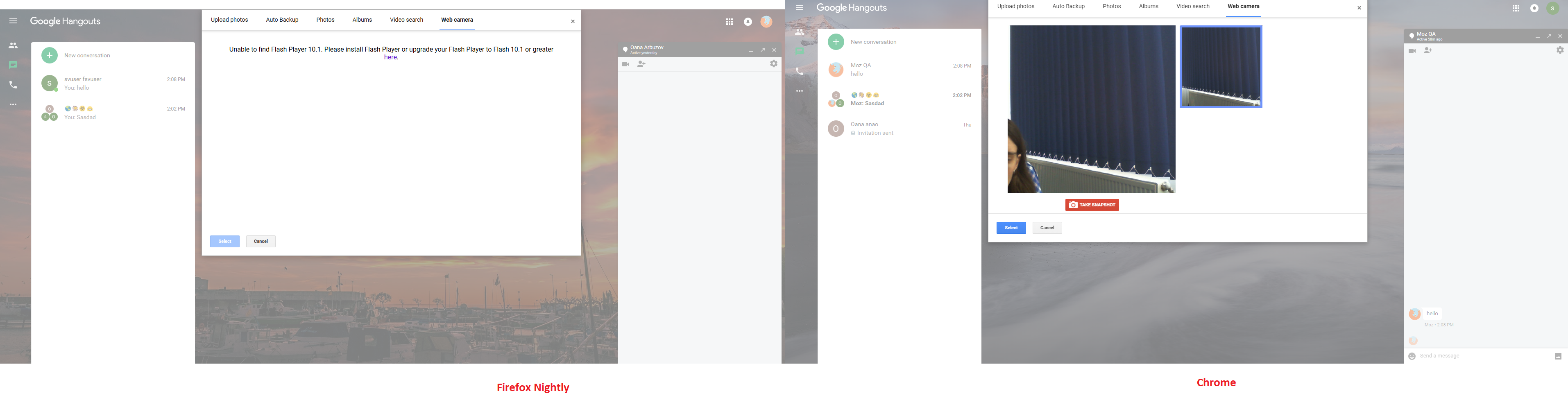
Description: Unable to activate Flash to send “Web camera” photos
Prerequisites
1. Web camera available and permission enabled.
2. “Plugins>Shockwave Flash” options set as “Always Active”.
3. Installed latest Adobe Flash Player 26 for Firefox – NPAPI.
Steps to Reproduce
1. Navigate to https://hangouts.google.com/?authuser=1
2. Start a conversation.
3. Click “Attach a photo” button.
4. Click “Web camera” tab from media picker overlay.
5. Observe behavior.
Expected Behavior:
Flash is enabled. Snapshot can be taken.
Actual Behavior:
Flash is not enabled. Snapshot can’t be taken.
Note:
1. Reproducible on Firefox 60.0.1 Release.
2. Not reproducible on Chrome 66.0.3359.181.
3. Screenshot attached.
Watchers:
@softvision-sergiulogigan
@softvision-oana-arbuzov
sv; country: us
From webcompat.com with ❤️
URL: https://hangouts.google.com/?authuser=1
Browser / Version: Firefox Nightly 62.0a1 (2018-05-25)
Operating System: Windows 10 Pro
Tested Another Browser: Yes
Problem type: Site is not usable
Description: Unable to activate Flash to send “Web camera” photos
Prerequisites
1. Web camera available and permission enabled.
2. “Plugins>Shockwave Flash” options set as “Always Active”.
3. Installed latest Adobe Flash Player 26 for Firefox – NPAPI.
Steps to Reproduce
1. Navigate to https://hangouts.google.com/?authuser=1
2. Start a conversation.
3. Click “Attach a photo” button.
4. Click “Web camera” tab from media picker overlay.
5. Observe behavior.
Expected Behavior:
Flash is enabled. Snapshot can be taken.
Actual Behavior:
Flash is not enabled. Snapshot can’t be taken.
Note:
1. Reproducible on Firefox 60.0.1 Release.
2. Not reproducible on Chrome 66.0.3359.181.
3. Screenshot attached.
Watchers:
@softvision-sergiulogigan
@softvision-oana-arbuzov
sv; country: us
From webcompat.com with ❤️